

Open the demo and a textured cylinder turns slowly in a browser tab. The program drawing it is one of Microsoft's own Direct3D 9 tutorials from the early 2000s. Its source has not changed. It still believes it is on Windows, talking to a graphics card through an API that browsers never had.
That little cylinder is the part of a much larger project I am allowed to show. Earlier this year I set out to run a whole 2000s Windows game client, about 400,000 lines of C++, in a browser, essentially unchanged, and play it online against a private test server. It worked, and the write-up is on this blog. The graphics layer that made it possible is now a library of its own, Portico, open source under MPL-2.0.
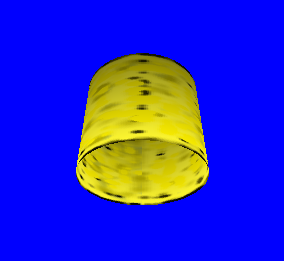
Tutorial 5 running in the browser. The same source, built for Windows, draws the same frame.
The program never finds out where it is
What I like most about this approach is how little the program has to know. You keep its source. Portico supplies the Windows calls it expects, the compiler turns program and library together into WebAssembly, and the browser draws through WebGL2. Loops, timers, windows, textures: the old code asks for them the way it always did and gets an answer that works in a tab.
There are good tools for the other case, when all you have is an executable and you emulate a whole PC around it. Portico is for people who still have the source and want the original program, not a rewrite. If that is you, the first five Microsoft tutorials are in the repository, and the porting guide shows how to link your own program.
Two graphics APIs that almost agree
Most of the work was not in the big features. It was in the places where two graphics systems agree on nearly everything and differ on one detail: what a depth value means, which way the vertical axis points, when a frame counts as finished.
A Windows program owns its loop and never gives the screen back; a browser only shows a frame when the program yields. Portico pauses inside the call that presents a frame, lets the browser breathe, and resumes as if nothing happened. The program's loop stays exactly as it was written.
Old fixed-function graphics describe a scene through settings, while modern browsers want small shader programs. Portico generates those programs from the settings on the fly, and caches them. I knew this part was right only when I could prove it, which brings me to the part I am proudest of.
How I know it works
Every sample is rendered three ways from the same source: on Windows with the real Direct3D 9, with Portico natively on Windows, and with Portico in the browser. The animation clock is frozen so each renderer catches the cylinder at the same instant, and the three images are compared pixel by pixel, in tiles, so a missing object in a corner cannot hide behind a good average.
All five tutorials match in all three environments, and a continuous integration job repeats the browser comparison on every push. When the documentation of a math function left its behaviour open, I called the original Microsoft library and compared the answers.
AI coding agents wrote much of this code under my direction and review. These comparisons are how I check what we built, and they are the reason I felt comfortable publishing it.
What is next
Portico covers the fixed-function pipeline, the math and texture helpers, and a small set of windowing calls. Programmable shaders, more of Win32 and a packaged setup for programs that block on their own threads are on the roadmap.
If you have an old Direct3D program in a drawer and a copy of its source, I would love to know whether Portico runs it. And if you have ported something old to somewhere new, tell me what broke along the way.
Links
- Live demo: Microsoft's first five Direct3D 9 tutorials, running in the browser.
- Portico on GitHub: source, samples and documentation, MPL-2.0.
- Porting guide and roadmap.
- The bigger port: the 400,000-line Windows game client Portico was extracted from.